CapCut Pro vs Invideo AI plans: choose by workflow and billing model, not a stale headline price.
These subscriptions solve different cost problems. CapCut Pro is primarily a premium editing subscription offered monthly or annually. Invideo AI is more generation-led: credits are spent on AI creation and model use, reset on the plan cycle, and can be topped up. The better fit depends on whether you mostly edit existing footage or pay for repeated AI generation.
Plan mechanics were checked against current CapCut and Invideo official help/pricing documentation on August 7, 2026. CapCut explicitly says pricing can vary by region, device and promotions; Invideo says model and credit prices can change. Verify the live checkout before subscribing.
Pay for the editing environment
Monthly and annual Pro billing is the core choice. Use the live account checkout because CapCut does not publish one dependable global price.
Budget for generation volume
Credits are consumed by video creation, generative models and other AI features. Different models can cost different amounts, and included credits reset monthly.
The key question is what creates your monthly cost.
If your work starts with footage and ends in an editor, CapCut Pro is the cleaner subscription comparison. If your work starts with prompts and repeated AI generation, Invideo's credit budget is the more important constraint.
Your workflow is edit-first.
- You already have clips to cut and arrange
- Premium editing tools and assets drive the upgrade
- Monthly versus annual billing is easier to budget than generation-by-generation usage
- You are willing to verify the current regional checkout price
Your workflow is generation-first.
- You want prompts to assemble a first video
- Your monthly usage can be estimated in credits
- Access to multiple generative models matters
- You can monitor credit burn and buy top-ups when needed
What materially changes between the two paid-plan models.
Billing structure
CapCut Pro: monthly or annual subscription.
Invideo AI: paid plan plus a monthly credit allowance; extra credits can be purchased separately.
Price certainty
CapCut: official help says the displayed price can vary by region, platform and promotions.
Invideo: its live pricing page is the source of record, and the company says model and agent prices are subject to change.
What usage consumes
CapCut: the subscription unlocks premium editing benefits; some current plans also include AI allowances, so check the live benefit list.
Invideo: credits are used for video creation, generative models and AI features; downloads and exports do not consume credits.
Unused allowance
Invideo: included plan credits reset monthly and do not roll over. Extra credits purchased separately have different validity rules.
CapCut: verify any AI-credit allowance and reset terms shown in your current Pro checkout because plan benefits have been changing.
Workflow fit
CapCut: strongest fit when the user wants hands-on editing control over existing or generated media.
Invideo: strongest fit when the user wants an AI system to create more of the first cut from a prompt, script or brief.
Decision rule
Do not compare only the monthly sticker price. Compare the workflow you will actually run, the amount of AI generation required and the current renewal terms.
Verify the plan that matches how you create.
These links stay inside Read4Max Guides. This comparison page adds no new outbound affiliate destination; monetization remains on the existing tracked plan/product guides.
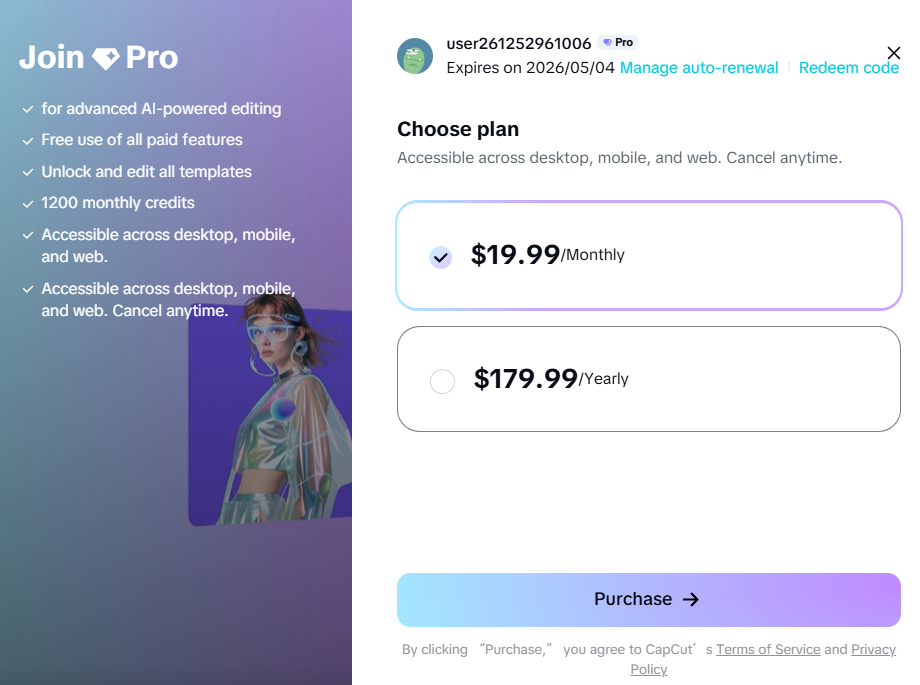
CapCut Pro
CapCut currently offers Pro on monthly and annual billing. Its help center warns that the actual price can vary by region, device and promotions, so the live checkout is the price source of record.
Best fit: Creators who primarily edit footage, want premium editing assets and prefer a conventional monthly-or-annual subscription decision.
Open plan guide →
Invideo Plans and Credits
Invideo AI uses credits for generation and AI features. Current help documentation says plan credits reset monthly and do not roll over, while extra credits can be bought separately.
Best fit: Creators whose main cost driver is prompt-based generation volume and who need to estimate recurring AI-credit consumption before subscribing.
Open plan guide →CapCut Pro vs Invideo AI plans FAQ.
Is CapCut Pro cheaper than Invideo AI?
There is no reliable universal answer because CapCut says its price can vary by region, device and promotions, while Invideo uses plan and credit allowances that can change. Compare the live checkout and the amount of AI generation you expect to use.
Does CapCut Pro use the same credit model as Invideo AI?
No. CapCut Pro is presented as a monthly or annual premium subscription, while Invideo explicitly meters many AI-generation tasks through credits. CapCut can also include AI-credit allowances, so verify the current plan benefits before paying.
Do unused Invideo credits roll over?
Invideo's current help documentation says included plan credits reset monthly and do not carry forward. Separately purchased extra credits have their own validity rules.
Which plan model is easier to budget?
CapCut is easier to think about as an editing subscription when your workflow is mostly manual editing. Invideo requires more attention to generation volume because different models and tasks consume different amounts of credits.
What should I verify immediately before subscribing?
Check the current checkout price, billing period, AI or generation allowance, renewal terms, platform access and whether the workflow you actually use is included. Both companies can change plan details.
Estimate your real monthly workflow, then check the live terms.
Read4Max may earn a commission if you later use a sponsored retailer or service link on an exact product guide, at no extra cost to you. This comparison does not guarantee savings or results.
Choosing a plan for YouTube Shorts?
Compare the Shorts workflow first, then use this plan page to judge how the paid model fits your expected production volume.